Case Study #1 - Multi-Hop Connection
Issue
Client located in Hong Kong can only connect to a Hong Kong Server via WireGuard, but needed to route the traffic to their US Server.
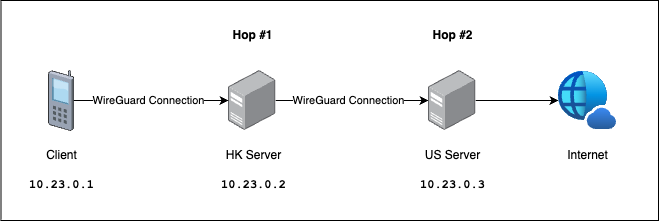
Solution
Specifications
Device | OS | WireGuard IP | Public Key | Private Key |
|---|---|---|---|---|
Client | iOS |
|
|
|
HK Server | Ubuntu 24.04 |
|
|
|
US Server | Ubuntu 24.04 |
|
|
|
Configuration
Client
[Interface]
PrivateKey = ClientPriKey
Address = 10.23.0.1/32
DNS = 1.1.1.1
MTU = 1420
[Peer]
PublicKey = HKPublicKey
AllowedIPs = 0.0.0.0/0
Endpoint = HK_Server_Public_IP:51830
PersistentKeepalive = 21
HK Server
[Interface]
Address = 10.23.0.2/24
SaveConfig = true
ListenPort = 51830
PrivateKey = HKPrivateKey
PostUp = ip rule add from 10.23.0.0/24 lookup 789
PostUp = ip rule add iif %i table 789 priority 456
PostUp = iptables -A FORWARD -i %i -j ACCEPT
PostUp = iptables -t nat -A POSTROUTING -o %i -j MASQUERADE
PostUp = ip route replace 10.23.0.0/24 dev %i
PreDown = ip route del 10.23.0.0/24 dev %i
PostDown = ip rule del from 10.23.0.0/24 lookup 789
PostDown = ip rule del iif %i table 789 priority 456
PostDown = iptables -D FORWARD -i %i -j ACCEPT
PostDown = iptables -t nat -D POSTROUTING -o %i -j MASQUERADE
[Peer]
PublicKey = ClientPubKey
AllowedIPs = 10.23.0.1/32
Endpoint = 192.168.31.65:61934
[Peer]
PublicKey = USPubKey
AllowedIPs = 0.0.0.0/0
US Server
[Interface]
Address = 10.23.0.3/32
SaveConfig = true
PreUp =
PostUp = iptables -A FORWARD -i %i -j ACCEPT; iptables -A FORWARD -o %i -j ACCEPT; iptables -t nat -A POSTROUTING -o eth0 -j MASQUERADE;
PreDown =
PostDown = iptables -D FORWARD -i %i -j ACCEPT; iptables -D FORWARD -o %i -j ACCEPT; iptables -t nat -D POSTROUTING -o eth0 -j MASQUERADE;
ListenPort = 51821
PrivateKey = USPrivateKey
[Peer]
PublicKey = HKPublicKey
AllowedIPs = 10.23.0.2/32
Endpoint = HK_Server_Public_IP:51830
PersistentKeepalive = 25
Result
donaldzou@Mac ~ % traceroute github.com
traceroute to github.com (140.82.116.3), 64 hops max, 40 byte packets
1 10.23.0.2 (10.23.0.2) 3.926 ms 1.898 ms 2.329 ms
2 10.23.0.3 (10.23.0.3) 4.599 ms 9.107 ms 3.872 ms
3 74.199.178.1 (74.199.178.1) 0.611 ms 0.557 ms 0.738 ms
...
As we can see, our traffic is sent from the client, to the HK Server (10.23.0.2) and then US Server (10.23.0.3) then to the internet. Mission accomplished!
Last modified: 22 April 2025